
Launcher related
Where is SKlauncher installed?
Depending on which build you grabbed, SKlauncher isn't really installed. It's downloaded into the same folder as the game.
INFO
- Copy the path for your OS into the address bar of your file manager to jump there.
- On Linux and macOS, dot-folders (e.g.
.minecraft) are hidden by default.
- On Linux and macOS, dot-folders (e.g.
- These are the default paths. They differ if you moved SKlauncher to another folder.
Minecraft location
%APPDATA%\.minecraft
SKlauncher location
- Setup case:
%APPDATA%\sklauncher - Other cases: same as the Minecraft path.
Can I install SKlauncher in another folder?
Yes, run it with --workDir. A few things to know:
- Use absolute paths. Relative paths or
.(current directory) can break things. - Everything that would have gone into
.minecraftends up in yourworkDirinstead. - If you already have game directories defined, update them to the new path.
INFO
This is where SKlauncher (and the game) downloads everything when not using Setup. If you mean the Windows Setup specifically: modify the install or reinstall, and pick the location yourself when prompted.
Create a shortcut (or edit an existing one), or run from CMD / Terminal:
- Shortcut: right-click
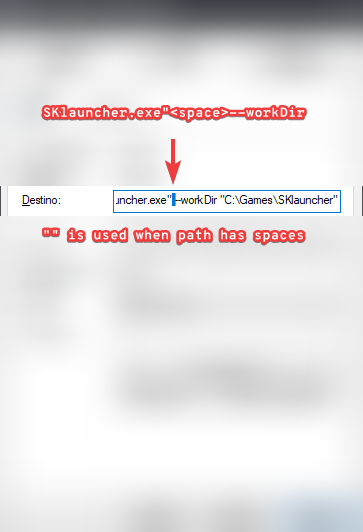
SKlauncher.exe/.jar> Create shortcut > right-click the new shortcut > Properties > General tab > Target: append--workDir "C:\Games\SKlauncher"(see reference image). - CMD:
SKlauncher.exe --workDir "C:\Games\SKlauncher"orjava.exe -jar SKlauncher.jar --workDir "C:\Games\SKlauncher"
Difference between Microsoft and Offline?
The Log in guide already explains this; here's a quick summary.
| Microsoft | SKlauncher | Offline | |
|---|---|---|---|
| Change your skin | Yes | Yes | No |
| Change your cape | Only if you won one | Yes | No |
| Visibility of your skin/cape | Global | SKlauncher players only | No |
| Servers you can join | Any | Offline servers only | Offline servers only |
Even more is covered in the Log in guide.
Microsoft has the clear advantage. The only real limit is the Cape. You also support the creators, who have been updating the game for over 17 years and still let you play every version released so far.
Can I use SKlauncher if I own Minecraft: Bedrock Edition?
No. SKlauncher is a launcher for Minecraft: Java Edition only. That said:
- If you own Minecraft: Bedrock Edition for PC, you should be able to claim Java Edition for free, which works with the launcher.
- If you only own Bedrock on console (Xbox, PlayStation, etc.) or mobile (iOS, Android), you'll need to buy Java Edition for PC separately.
Where can I buy the game?
- One-time payment: Official site or Microsoft Store.
- Subscription: Xbox Game Pass for PC.
- Temporary: Free Trial.
INFO
Always confirm you're buying Minecraft: Java Edition. Currently the listing usually bundles Java + Bedrock together, which is fine.
DANGER
Reseller / key-selling sites can be cheaper, but tread carefully. Stolen keys hurt everyone: the creator loses money chasing fraud, and you can lose access to the game when the key is invalidated.
Is SKlauncher piracy?
No. All game files come from official Mojang servers (which are publicly accessible and even include the launch parameters to use). Nothing is re-hosted or cracked. The same way a server picks its online-mode, the client can toggle demo mode.
Third-party launchers exist to make life easier (mod loaders, mods, modpacks, etc.). You could literally start the game with a hand-written .bat / .sh file.
Is SKlauncher a virus?
See the virus FAQ for the full answer (it's a complex topic). Short version: no. SKlauncher never had, doesn't have, and never will have viruses.
Is SKlauncher open source?
Not at the moment. There are plans to open-source it eventually. The current code isn't obfuscated, so you can decompile and inspect it yourself. The Windows installer is open source: github.com/sklauncher/installer.
We would like to go open-source in 2024, but it's not so simple. Many parts of the launcher is not ready for foss, but I would love to make it foss. When I started this project I never intended it to be open-source as you need some sacrifices for it, and back then most of the projects weren't open-source, and a lot still isn't. Just look for paid plugins on spigot, it's closed source and even obfuscated. Does sticking a price makes it safe? No. But yes, java is fully decompilable, and you can read the code pretty close to the original (unless it's obfuscated), there are some launchers that are open-source, there are launchers that are closed source, and bruh, there are launchers that are open source where the source is obfuscated, so it's not really open source. But here you can read the source, while the licenses doesn't allow you to just clone the launcher for your needs. I wouldn't like to see my work where someone just changed it's name and logo, but's thats the price of being open source
Open source ≠ secure. Platforms like GitHub don't warn you about dangerous code, and "open source" can lull you into thinking somebody else already audited this. Often, nobody has.
Can I force Demo mode?
Yes. Run the launcher with --demo. Skin and cape should still be visible.
Can I use clients, mods, resource packs, shaders, etc. in SKlauncher?
Yes. Anything that works for the Minecraft Launcher should work in SKlauncher. Only the install path may differ:
- SKlauncher 3.2.x: install Mod Loaders and Modpacks from the Installations Manager. Minecraft Launcher requires you to do this manually.
- SKlauncher 3.3.x Not released yet: in addition to the above, install Mods, Resource Packs, Shaders, and Maps directly.
INFO
Some clients (and a few mods) require Compatibility Mode, which disables the SKlauncher skin system.
The Modding guide walks through mod loaders. For everything else, Google and YouTube are your friends. A few tips:
- Right-click an installation > Open installation directory to find your real game folder (matters if you've set a Game Directory).
- Just like the launcher pulls from CurseForge and Modrinth, you can browse those sites manually.
- Guides for the Minecraft Launcher (manual installs) are fine. Guides for other launchers may not work.
How does Game Directory work?
--workDir basically says "my .minecraft lives elsewhere". Game Directory does the same thing per installation. It's how you keep options, worlds, and mods separated between, say, Release 1.8 and Release 1.16.5.
- Game Directory not set: all installations share one set of worlds, options, and mods.
- Game Directory set:
- Most files still download to
.minecraft(you'll still install your Mod Loader there). - Per-instance assets (individual mods, options, worlds, game / crash logs, etc.) live in the Game Directory.
- Most files still download to
TIP
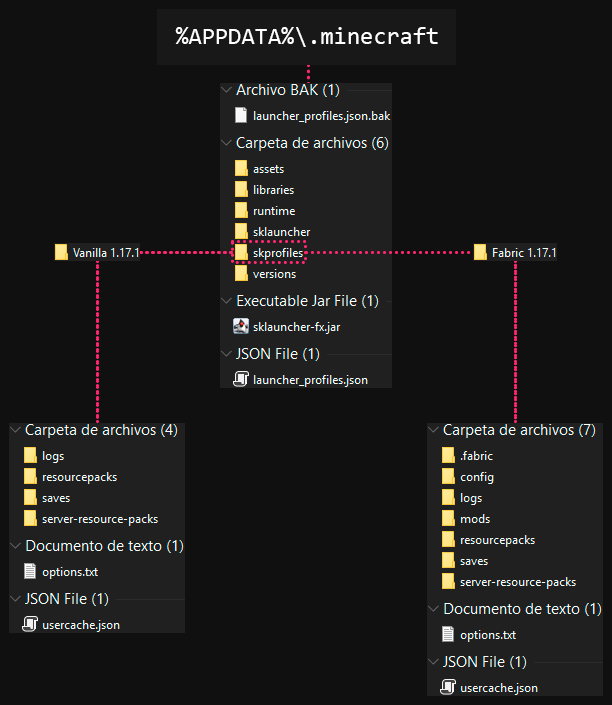
In the reference image, Vanilla 1.17.1 uses "%APPDATA%\.minecraft\skprofiles\Vanilla 1.17.1" and Fabric 1.17.1 uses "%APPDATA%\.minecraft\skprofiles\Fabric 1.17.1".
skprofiles, Vanilla 1.17.1, and Fabric 1.17.1 were created manually. You can name them whatever you like (Game-Instances, Custom, Example, etc.). The only rule: don't put them inside game folders (e.g. versions).
INFO
Right-click an installation > Open installation directory opens that installation's Game Directory.
Can I use a different Java for the game?
Yes. Edit the installation, find More Options > Java Executable, click the folder icon, and pick the javaw.exe (Windows) or java (Linux / macOS) you want. Temurin, Liberica, anything works.
To revert to Use bundled Java runtime, just clear the path you set.
TIP
Don't install one Java for SKlauncher and another for the game. Use a portable Java distribution (.zip on Windows, .tar.gz on Linux / macOS). You can experiment freely. The Java that won't start SKlauncher might be the one that gives you the best in-game performance.
How to uninstall SKlauncher?
Depends on which build and how thoroughly you want to clean (just SKlauncher, or all traces of Minecraft too).
- Setup case: pick one of:
- Control Panel > Programs & Features > Uninstall > select SKlauncher.
- Settings > Apps > Installed Apps > select SKlauncher.
- Run
unins000.exefrom the SKlauncher install folder.
- Other cases:
%APPDATA%\java(you might find it, but it's not actionable for you).- In the SKlauncher install folder, delete the
sklauncherfolder and thesklauncher-fx.jarfile. - Delete the
SKlauncher.exe/.jaryou downloaded.
To remove everything, also delete the .minecraft folder, uninstall Java, and restart the PC.
Where are the logs located?
Launcher logs always live with .minecraft. Game logs live in the game directory.
- Launcher:
.minecraft\sklauncher\sklauncher_logs.txt - Game:
.minecraft\logs\latest.logand.minecraft\crash-reports\crash-YYYY-MM-DD_HH.MM.SS-client.txt
TIP
Paste log contents into mclo.gs and share the link instead of dumping a wall of text. Or upload the file directly to Discord.
Read what the launcher tells you. After a crash, the launcher shows two buttons in the top-right; one of them gives you a link to the report.
Debug mode
Sometimes you need extra detail in the logs to track down a problem.
WARNING
Only enable debug mode if asked to. Revert the changes afterwards.
DANGER
Be careful with what you share. Debug logs may include sensitive data:
- Access tokens and session IDs
- IP addresses and connection details
mclo.gs is recommended because it auto-censors things like access tokens (especially relevant for Microsoft login). This only matters when you're debugging the game; the launcher won't start path below has nothing sensitive.
Can't even reach the launcher?
- Download the
.jarbuild of SKlauncher and run it from a terminal:java -jar SKlauncher.jar - Copy the entire console output (after it stops or stalls) and paste it into Discord.
Can't start the game, or the game has issues?
- Open the launcher, go to Launcher Settings, and enable Show Launcher Console. A new Launcher Log tab appears in the main screen. Click it.
- Edit the problem installation. Under More Options:
- Launcher Visibility: Keep the launcher open and show game output
- JVM Arguments: append
-Xdiag -Dsklauncher.debug=true(mind the leading space when you paste).
- Start the game. The Game Output window will appear. Reproduce the issue, then share everything.
INFO
- Launcher Log tab matches the launcher log file.
- Game Output window is roughly the same as both game log files combined, with a bit more context up top. Sharing this is usually enough.
Need more help?
If your question isn't here, see the Web related FAQ for ways to reach the community.